Every role, properly logged.
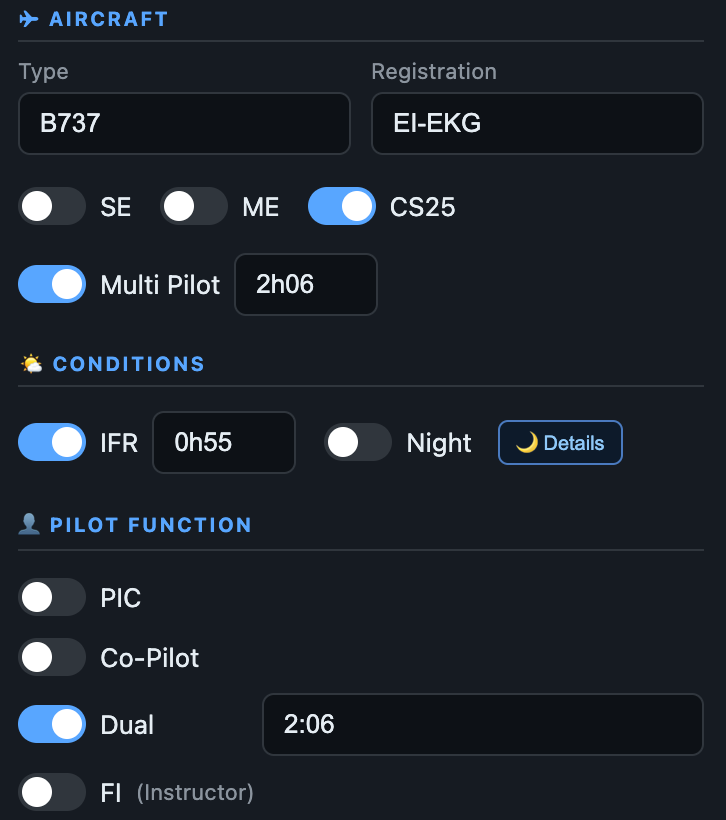
Record PIC, Dual, Co-Pilot and Flight Instructor time on the same flight, with clear totals for every function.

AirLedger records every flight, maps your routes, totals your hours, watches your currency and computes your night time — one clean, private logbook for your Mac.
Dashboard & routes
Enter a flight in seconds — AirLedger handles the arithmetic, the mapping and the compliance watching for you.
EASA-style fields — PIC, dual, SE/ME, IFR, night, multi-pilot, FI, approaches, take-offs and landings. Airport names fill in as you type the ICAO.
Great-circle routes on an interactive map with geo-stats, airspaces and your home base — see where your career has taken you at a glance.
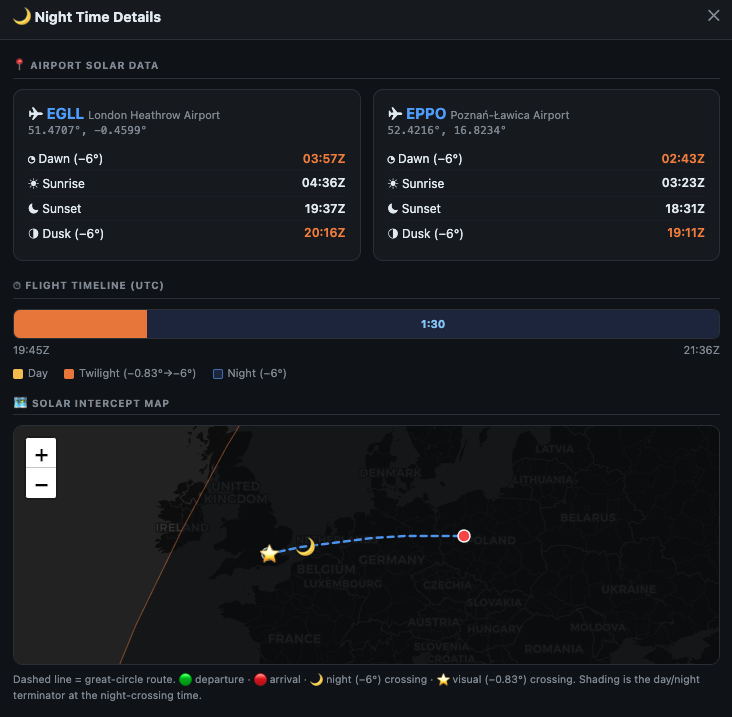
Night minutes are worked out from the sun's position along the actual route — the same method as a dedicated night calculator, done automatically.
Running totals by type and function, 90-day recency and reminders before your medical, licence or LPC/OPC expire — nothing lapses unnoticed.
Income composition, net per flight-hour, monthly and yearly views, and a one-click PDF report of any month's activity.
Generate a print-ready PDF in the official EASA FCL layout, export an editable Excel logbook, or save a complete JSON backup of your data.
Log the information a professional pilot needs. AirLedger fills in the calculations and keeps every entry consistent as you type.
Record PIC, Dual, Co-Pilot and Flight Instructor time on the same flight, with clear totals for every function.

Enter your off-block and on-block times. The total flight duration is worked out automatically — including flights crossing midnight.

The app calculates loggable night time from the route, date and sun position, then adds it directly to the flight record.

Record the approach type, runway and conditions. Your preferred approach can be pre-filled whenever IFR is selected.

Turn every logged flight into useful totals, visual trends and geographic insights — for any period of your career.
See PIC, Dual, Co-Pilot and FI time alongside IFR, Night, SE, ME, CS25 and multi-pilot totals — all updated automatically.

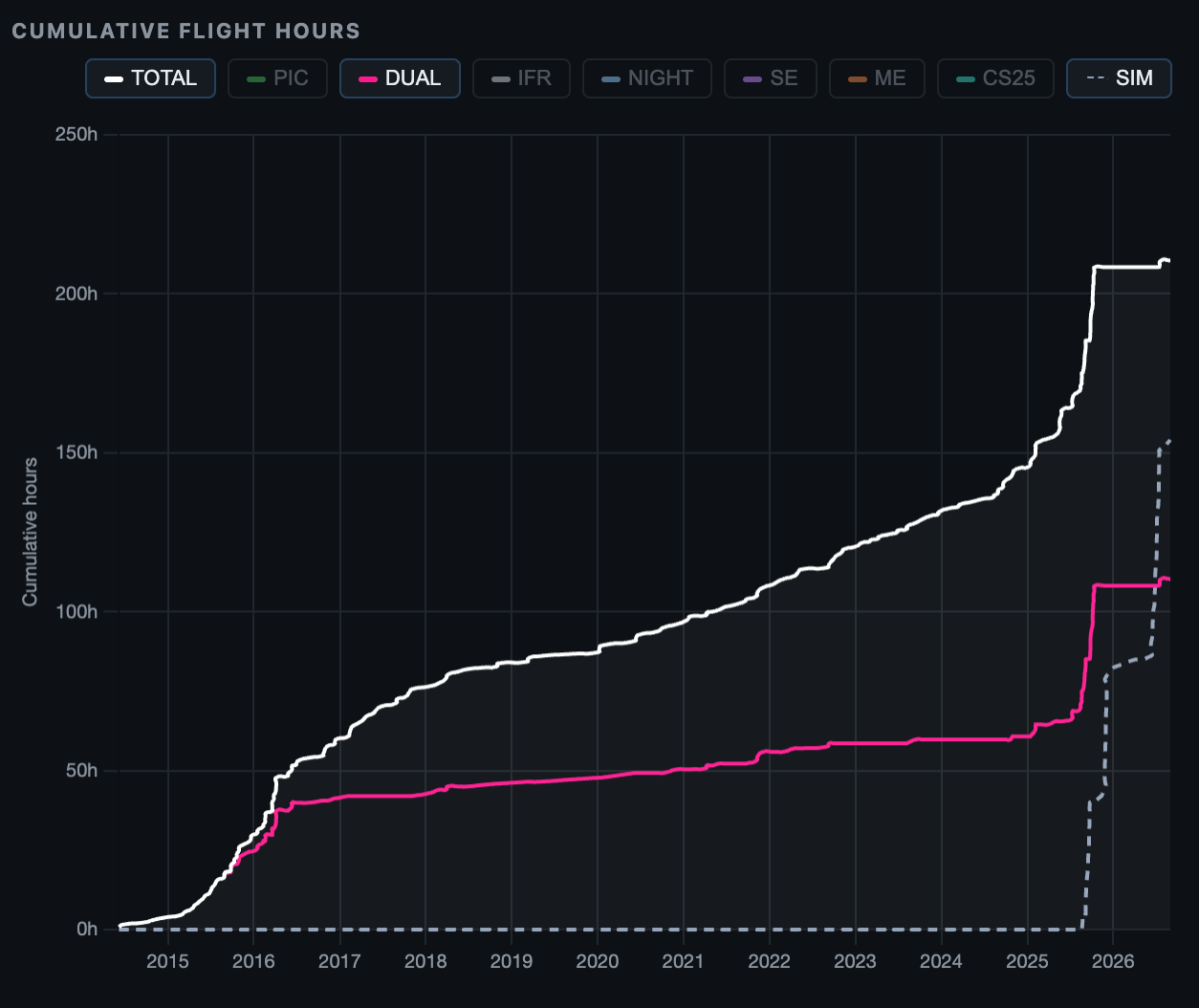
Follow monthly activity and cumulative flight hours over time, with separate curves for the categories that matter to you.

Explore airports, routes, total distance, your most visited aerodrome and longest sector — a geographic summary of where your logbook has taken you.

Choose from more than eight graph types and combine complementary displays to focus on the activity, period or qualification you want to analyse.
Keep pilot recency, flight-time limits and qualification expiry dates visible in one place — before they become a problem.
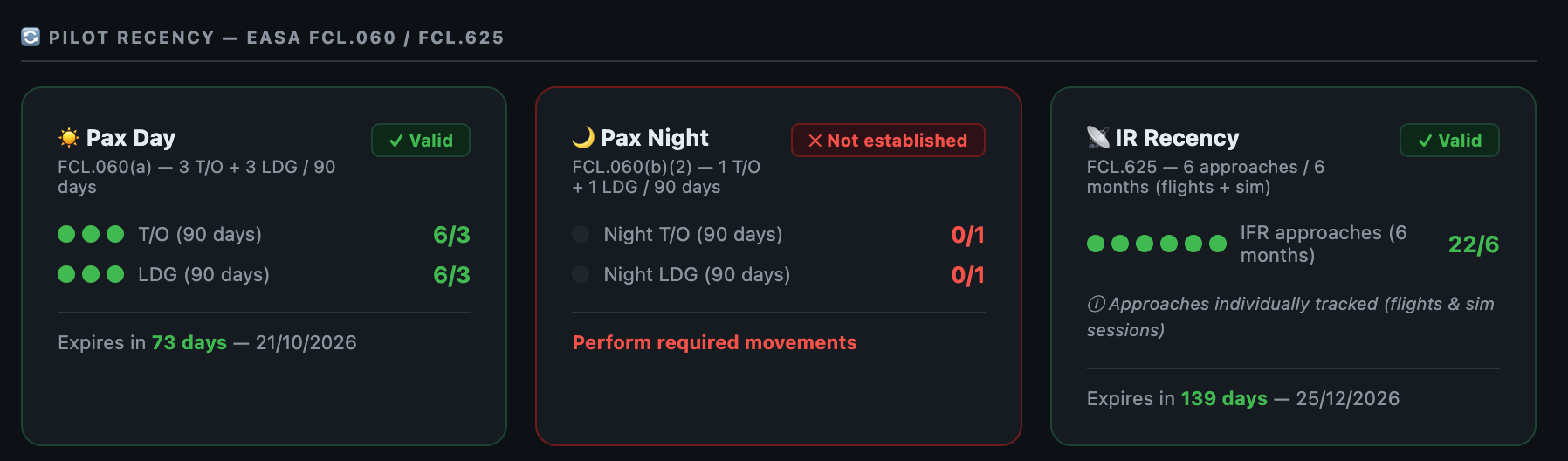
Monitor day and night take-off and landing currency alongside IR approach recency, with clear validity status, progress and expiry dates.

Follow 28-day, calendar-year and rolling 12-month flight-time limits with used percentages and remaining hours calculated automatically.

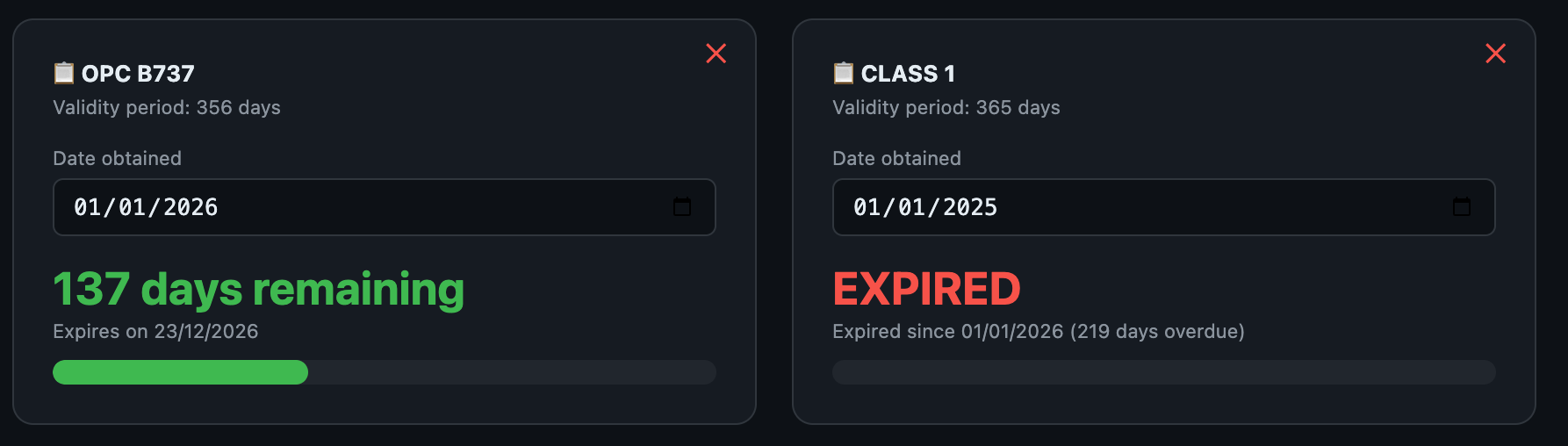
Track licences, medicals, type ratings and recurrent checks with their validity periods, expiry dates and the exact number of days remaining.

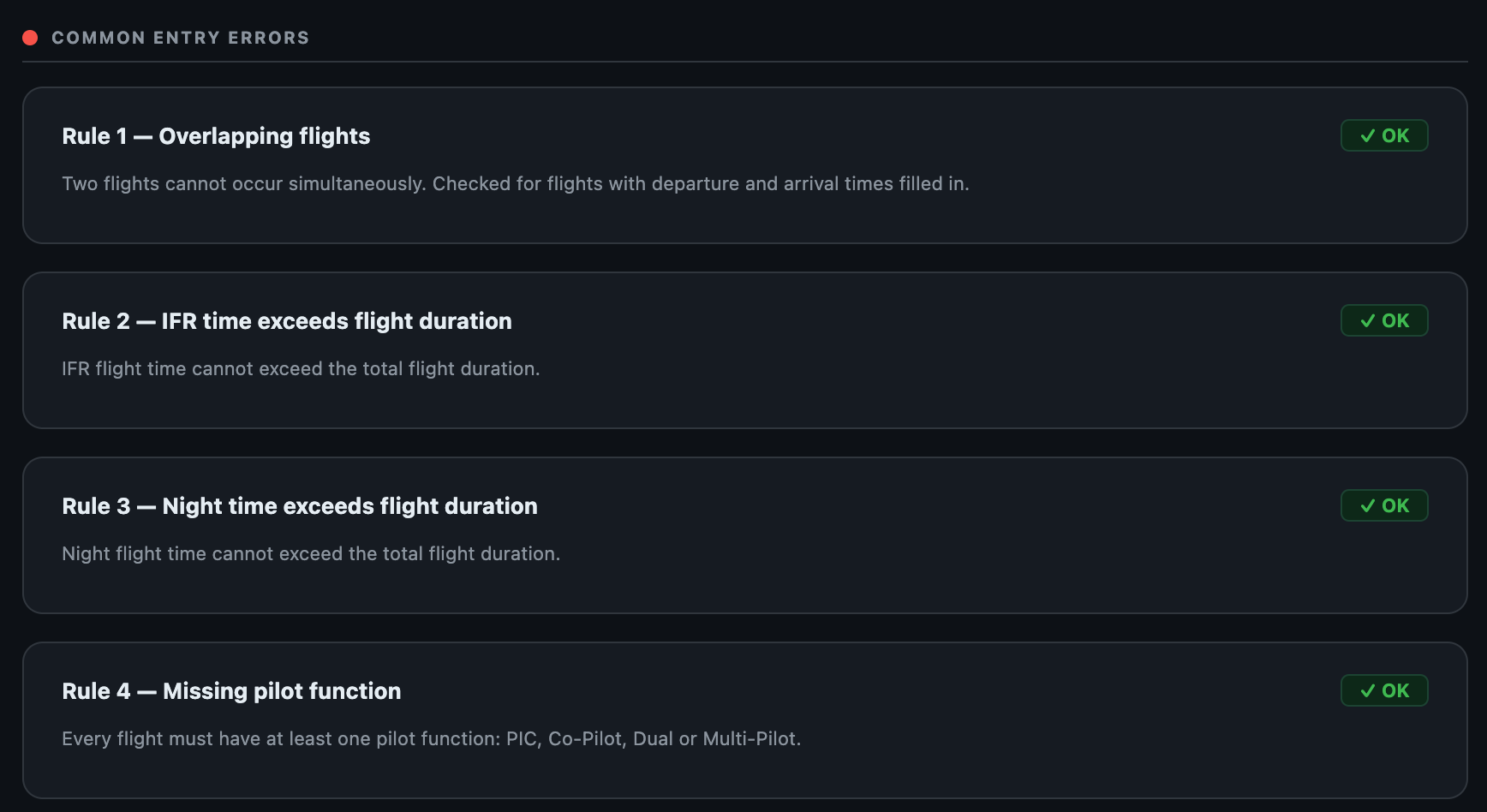
More than 14 automatic checks continuously monitor your flights for conflicts and inconsistencies, keeping your logbook data coherent and reliable.
AirLedger continuously verifies more than 14 consistency rules, detecting overlapping flights, impossible durations, missing pilot functions, night time longer than the flight, malformed airport codes and more — with a clear explanation of every issue.

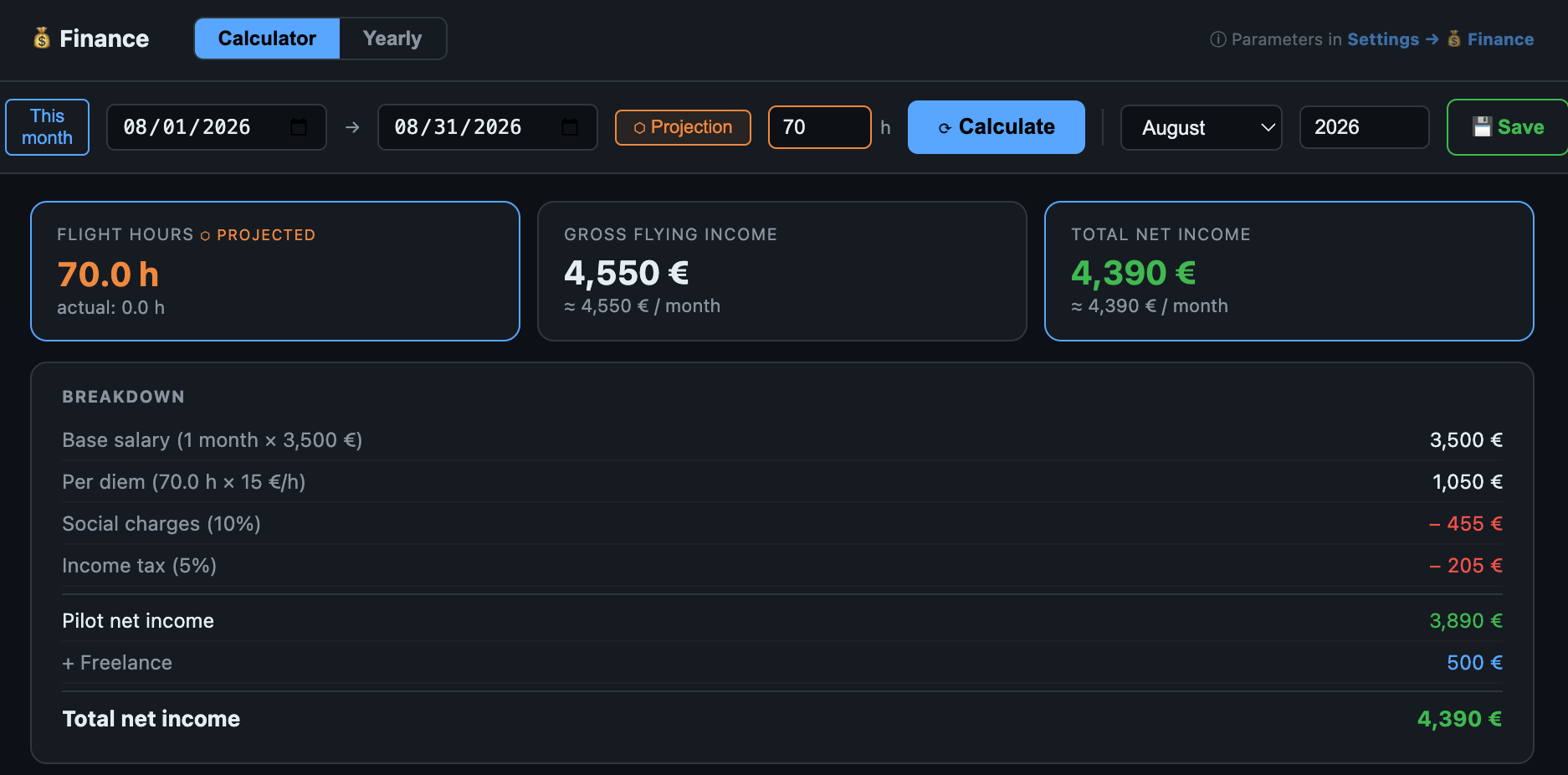
Turn your logged activity into a clear estimate of your income, with the flying hours behind every figure.
Set your pay model and AirLedger calculates gross income, estimated net income and your effective rate per flight hour, with monthly and yearly views.

AirLedger never requires you to share your flight data. Everything can stay on your Mac — and, if you choose, automatic iCloud backups keep a safe copy in your own account.
Your logbook is stored locally on your Mac. There’s no AirLedger account and no server receiving your flights — your data remains yours.
Enable iCloud backup whenever you want. Once activated, AirLedger automatically saves copies to your own iCloud Drive so your logbook is never lost.
Keep additional copies wherever you choose. Export a complete JSON backup, an Excel logbook or a print-ready EASA PDF at any time.
Get the convenience of a modern digital logbook without committing to another recurring subscription.
| What matters | AirLedger | Paper logbook | Subscription apps |
|---|---|---|---|
| Payment model | €9.99 once | One-time purchase | Recurring payment |
| Automatic calculations | Included | Manual | Usually included |
| Lifetime updates | Included | Not applicable | Only while subscribed |
| Private local storage | Yes | Yes | Varies by provider |
| EASA PDF & Excel export | Included | No | Varies by plan |
| Regulatory monitoring | Included | Manual | Varies by plan |
General comparison by product category. Individual services and plans may differ.
Yes. AirLedger is currently a macOS-only application. There is no Windows, Linux, iPhone or iPad version available at this time.
AirLedger runs natively on Apple Silicon Macs (M1, M2, M3 and M4) with macOS 11 or later. No Intel build for now.
Yes. Your data is stored locally on your Mac — there's no account and no cloud sync required. You can enable automatic backups to a folder or to iCloud Drive if you want an extra copy.
No. Pay €9.99 once — about the price of a landing fee — and the complete logbook is yours, with every future update included for life. No recurring fees and no ads.
Yes — generate a print-ready landscape A4 PDF in the official EASA FCL logbook layout, export an editable Excel file, or save a complete JSON backup of all your data.
The flight form covers the usual EASA columns: PIC, dual, single/multi-engine, IFR, night, multi-pilot, instructor, approaches, take-offs and landings, plus a full totalizer.
Yes. Deactivate your licence on the old Mac from the settings, then activate it on the new one. Your data moves with your backup file.
Pay once and keep the complete app forever — with every future update included. No subscription, ever.
Pay €9.99 once by card or PayPal. There is no subscription and no recurring charge.
Receive the macOS application and your licence details immediately after payment.
Install AirLedger on your Mac, activate your licence and begin adding or importing flights.
Requires an Apple Silicon Mac (M1–M4) running macOS 11 or later.
For the price of a landing fee, get a complete private logbook and every future update for life.
Get AirLedger — €9.99